
Imagine this…You type just one sentence, and a full video is created for you automatically. No camera. No editing. No actors. Sounds crazy, right? But this is exactly what Seedance 2.0 does.
Today, making videos is not easy. It takes time, money, and skills. You need editing software, good equipment, and experience. But now, AI tools are changing everything. And one of the most powerful tools right now is Seedance 2.0.
In this guide, you will learn everything you need to know about Seedance 2.0 in a simple and easy way. We will explain what Seedance 2.0 is, what features it offers, and how you can use it step by step to create your own videos. You will also understand how much it costs and which plan is best for beginners.
If you want a complete beginner-friendly walkthrough, check our detailed how-to-create videos using Seedance 2.0 step-by-step guide.
Seedance 2.0 is an AI tool that converts simple text ideas into cinematic videos in seconds. You just type a prompt like a scene or action, and it automatically generates a video without cameras, editing software, or technical skills.
It is developed by ByteDance (TikTok’s parent company) and is designed for modern content creators who need fast, high-quality video production. It belongs to the AI text-to-video category and simplifies the entire creation process.
You can use it for YouTube videos, social media reels, ads, marketing content, product showcases, storytelling, and brand promotion. It helps creators and businesses produce professional videos quickly and easily, saving both time and effort.
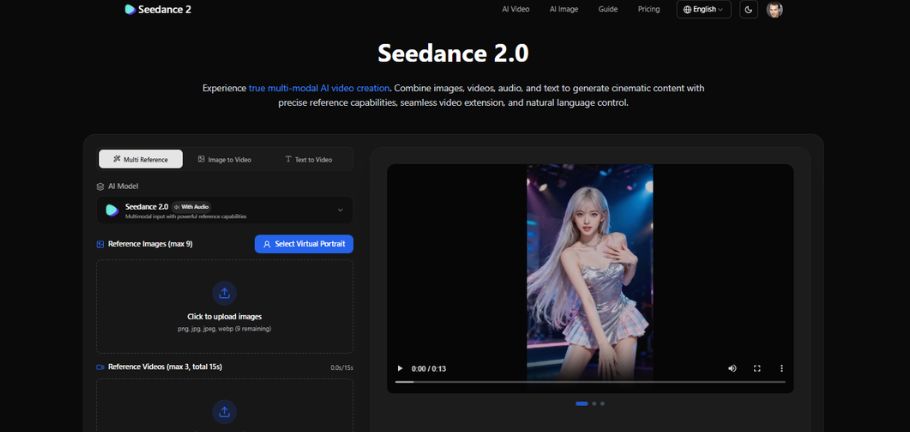
Seedance 2.0 is packed with powerful features that make AI video creation simple, fast, and highly creative. It is designed for beginners as well as professionals who want cinematic-quality videos without complex editing.
Text-to-Video Generation
This is the main feature where you type an idea, and the AI converts it into a full video scene. You can describe actions, mood, environment, and even timing in simple language, and the tool understands it very well. It removes the need for cameras or editing tools and works completely through prompts, making video creation extremely easy.
- Turn text into full cinematic videos
- No camera, actors, or editing required
- Supports images, video clips, and audio inputs
- Understands simple and detailed instructions
Cinematic Video Output
Seedance 2.0 creates videos that look like real movie scenes instead of basic AI clips. The output feels professional with proper lighting, smooth motion, and cinematic framing. It also supports different formats, making it useful for multiple platforms like YouTube and Instagram.
- High-quality HD output (720p/1080p)
- Realistic lighting and color grading
- Smooth cinematic camera angles
- Supports horizontal and vertical formats
AI Motion Control
This feature ensures that all movements in the video look natural and realistic. Instead of robotic animation, everything flows smoothly like real-life motion. It improves how characters, objects, and cameras behave in a scene.
- Natural character movement
- Smooth camera transitions (zoom, pan, tracking)
- Realistic object interaction
- Physics-based motion behavior
Scene Consistency
Seedance 2.0 keeps your video visually stable across multiple scenes. Characters, lighting, and style remain consistent throughout the entire video. This is especially important for storytelling and brand videos.
- Same character appearance in all scenes
- Consistent lighting and color style
- Smooth transitions between scenes
- No random visual changes
Prompt Understanding System
The AI understands both simple and advanced instructions very accurately. You can even give timing-based commands, and it will follow them in the video. This gives users strong control over the final output.
- Understands simple and complex prompts
- Follows timing instructions (e.g., “after 5 seconds”)
- Supports action-based control
- Produces more accurate video results
Now, let’s understand how you can actually create a video using Seedance 2.0. The process is simple, but if you follow each step properly, you can get much better results.
Step 1 – Open the Tool
Go to the Seedance 2.0 website and log in or sign up for a new account. After logging in, you will see the main dashboard. Take a moment to understand the layout so you can use it easily.
Step 2 – Enter Your Prompt
Write your idea in simple and clear words so the AI understands what you want. Try to include basic details like action, place, and style. A clear prompt always gives better results.
Step 3 – Select Style
Choose a style like cinematic, realistic, or animated. Each style changes how your video will look. Pick the one that best matches your idea.
Step 4 – Generate Video
Click the generate button and let the AI create your video. The system will process your prompt and build the video step by step. This may take a few seconds or minutes.
Step 5 – Export/Download
Once your video is ready, preview it inside the tool. If everything looks good, download it to your device. You can then use it for YouTube, social media, or marketing.
Seedance 2.0 works on a credit-based system where you use credits to generate videos, with higher-quality videos using more credits. It offers both free and paid plans, with the free version having limited features and paid plans providing better quality, speed, and flexibility. For beginners, the Basic plan is a good starting point, and overall, the tool offers strong value by saving time and making video creation easy for content, marketing, and social media use.
| Plan | Price | Features |
|---|---|---|
| Basic | $29.90/month | Standard speed, no watermark |
| Standard | $49.90/month | Faster generation, priority access |
| Pro | $99.90/month | Fast speed, higher usage |
| Max | $199.90/month | Maximum speed, full features |
Now let’s compare Seedance 2.0 with its strong competitor, Kling AI. Both tools are powerful and can turn text into high-quality videos, but they are built with slightly different goals in mind. If you understand these differences, it becomes much easier to choose the right tool for your needs.
Creative Control
Seedance 2.0 is built for users who want more control and flexibility. It lets you combine text, images, video clips, and audio in one project, giving you deeper control over the final output. Kling AI is more focused on simplicity and quick video creation, with fewer options for mixing inputs.
Video Quality
Both tools produce high-quality cinematic videos, but Seedance 2.0 handles complex scenes better. It keeps characters and scenes consistent and creates more natural motion. Kling AI is strong for clean, polished short clips that look smooth and visually appealing.
Speed
Kling AI is usually faster for simple prompts and quick results. Seedance 2.0 takes a bit more time because it processes multiple inputs like images, audio, and video references. The extra time helps improve accuracy and detail in the final video.
Pricing & Usage
Both tools use a credit-based system, but their focus is different. Kling AI is simple and quick for basic use, while Seedance 2.0 offers more flexibility for advanced users who want creative control and detailed video production.
In simple words:
- Seedance 2.0 is best if you want control, creativity, and detailed video creation
- Kling AI is best if you want speed, simplicity, and quick video results
Both are powerful tools, but your choice depends on whether you value creative control or fast output more.
| Features | Seedance 2.0 | Kling AI |
|---|---|---|
| Multimodal Input Support | Text, images, video clips, audio combined | Text, images, video, audio supported but less flexible |
| Video Quality | Strong cinematic output with better scene consistency | High-quality smooth short clips |
| Motion Control | Advanced AI motion control with realistic physics | Smooth motion with AI-directed movement |
| Scene Consistency | Very strong across multiple scenes | Good but slightly less stable in complex scenes |
| Speed | Medium (depends on input complexity) | Faster for simple prompts |
| Creative Control | Very high | Medium |
| Best Use Case | Storytelling, ads, and advanced creative videos | Quick social media clips and short videos |
If you want good results from Seedance 2.0, your prompt is the most important thing. A strong prompt can completely change the quality of your video.
A good prompt usually has four parts: subject, action, environment, and style. For example, instead of just writing “a car,” you should write something like “a red sports car driving fast through a neon-lit city at night, cinematic style.” This gives the AI a clear direction.
You can also add timing instructions like “slow motion at the end” or “camera zooms in after 3 seconds” to make your video more dynamic. Seedance understands these simple instructions very well.
Here is an example prompt:
“A red sports car driving fast through a neon-lit city at night, with glowing lights and reflections on wet roads. The camera starts with a wide aerial view, then moves closer to follow the car from the side. Cinematic lighting, smooth motion, and dramatic background music for a high-energy feel.”
Most issues in Seedance 2.0 happen because of simple mistakes like unclear prompts, too many inputs, or missing details. The good news is that these problems are easy to fix by using clear instructions, reducing extra inputs, and checking your credits.
Video Not Generating
Sometimes videos don’t generate due to low credits, server load, or too many heavy inputs. To fix this, check your credits, refresh the page, simplify your prompt, or try again after a few minutes.
Low-Quality Output
Low-quality videos usually come from weak or unclear prompts. To improve results, always include key details like environment, lighting, motion, and style so the AI can create a better scene.
Slow Rendering
Rendering can be slow when using complex prompts or multiple inputs like images, videos, and audio. You can fix this by reducing input files, simplifying the scene, and generating shorter videos.
Prompt Errors
Prompt errors happen when instructions are confusing or not structured properly. To avoid this, keep your prompt simple, avoid mixing opposite ideas, clearly define references, and break long prompts into clear parts.
Seedance 2.0 is a powerful AI video tool used for real content creation and marketing. It turns simple ideas into professional videos without needing cameras, actors, or editing software, making it popular among creators, marketers, and businesses. It is widely used for YouTube, ads, social media, and brand storytelling, where users can quickly create cinematic and engaging content for different platforms.
Key Use Cases
- YouTube videos (cinematic scenes, storytelling, background visuals)
- Ads & marketing (product promos, commercials, brand campaigns)
- Social media reels (Instagram, TikTok, Facebook short videos)
- Brand storytelling (emotional and cinematic brand content)
- Content creation for influencers and digital creators
So, the main question is simple. Is Seedance 2.0 really worth using or not? The answer depends on what you need, but overall, it is a very powerful and useful AI video tool, especially for creators and marketers who want fast results without technical skills.
Seedance 2.0 is best for people who want:
- Fast video creation without editing software
- High-quality cinematic visuals
- Easy content generation using simple prompts
- Creative freedom with images, video, and audio inputs
It is especially helpful for:
- Beginners who don’t know video editing
- YouTubers who need consistent content
- Marketers who want quick ad videos
- Social media creators aiming for viral content
Is Seedance 2.0 free or paid?
Seedance 2.0 usually offers both free and paid plans. The free version gives limited access with fewer credits, while paid plans provide more features, higher quality videos, and faster generation. Most serious creators prefer paid plans for better results.

How does Seedance 2.0 work?
Seedance 2.0 works by converting your text prompts into AI-generated videos. You simply describe your idea, and the system creates scenes, motion, and visuals based on your instructions. You can also add images, video clips, or audio to guide the output.
Do I need video editing skills to use Seedance 2.0?
No, you do not need any video editing skills to use Seedance 2.0. Everything is handled by AI, so you only need to write clear prompts. Even beginners can create professional-looking videos without learning editing tools.
What type of videos can I create with Seedance 2.0?
You can create many types of videos, such as cinematic clips, ads, social media reels, storytelling videos, and product promotions. It is flexible and works well for both creative and marketing content.
Is Seedance 2.0 better than Kling AI?
Seedance 2.0 is better for users who want more creative control and detailed customization. Kling AI is better for quick and simple video generation. Both are good, but the choice depends on whether you prefer control or speed.
Can I use Seedance 2.0 for YouTube videos?
Yes, Seedance 2.0 is very useful for YouTube content creation. You can create cinematic scenes, storytelling videos, intros, and background visuals. Many creators use it to produce high-quality videos quickly.
Seedance 2.0 is a modern AI video tool that turns simple text ideas into cinematic videos within minutes. It removes the need for complex editing and helps users create high-quality content quickly. It is beginner-friendly but still powerful enough for professional creators who want fast results with creative control.
With practice, users can unlock its full potential by writing better prompts and using different inputs like images, video, and audio. It works well for YouTube, ads, and social media content, making it a complete and efficient solution for AI video creation.
I’m Kashan Chishty, CEO of Concept Beans and a serial entrepreneur with over 25 years of experience in design, user experience, & digital innovation. I’ve successfully founded companies across the USA and Asia, including Dropesy, Affordable Pvt Ltd, and Concept Beans. My core expertise includes AI video generation, UX audits, product design, & strategic digital marketing.


